
Linking & Managing eBay Accounts
Linking your eBay seller account is what turns Price Spectre from an empty dashboard into an active repricing tool. This guide is the deep-dive companion to the Price Spectre Tutorial — it covers how to link your first eBay account, how to recognize and respond to reauthorization prompts, how multi-store sellers should think about Price Spectre accounts, how to unlink, and what to do when something in the linking flow does not go as expected.
If you are brand new to Price Spectre, the tutorial is a better starting point. Come back here when you need more detail or hit a problem with the link itself.
Table of Contents
- Before You Begin
- Linking Your First eBay Account
- What Permissions Price Spectre Requests
- After Linking: What Happens Next
- Reauthorizing an Expired Connection
- Managing Multiple eBay Accounts
- Unlinking an eBay Account
- Troubleshooting Failed Links
- Frequently Asked Questions
- Related Guides
Before You Begin
To link an eBay account to Price Spectre, you need three things:
- An active eBay seller account. A buyer-only eBay account will not work — Price Spectre needs to be able to view and update listings on your behalf, which is something only seller accounts have.
- A Price Spectre account. If you have not registered yet, see the Creating Your Account section of the Price Spectre Tutorial for the two registration paths (sign up with eBay, or sign up with email).
- A browser that permits cookies and redirects between Price Spectre and eBay. The link flow redirects you out to eBay's sign-in page and then back to Price Spectre. Strict privacy settings, browser extensions that clear cookies between sites, or aggressive tracking-protection modes can interrupt the redirect and leave the link incomplete.
Tip: If you signed up using the Sign Up with eBay path, your eBay account was already linked as part of registration. You can skip ahead to After Linking: What Happens Next.
You should also know that each Price Spectre account links to one eBay seller account. If you operate more than one eBay store, see Managing Multiple eBay Accounts for the recommended setup.
Linking Your First eBay Account
If you registered with email and have not yet linked an eBay account, follow these steps:
- Sign in to Price Spectre.
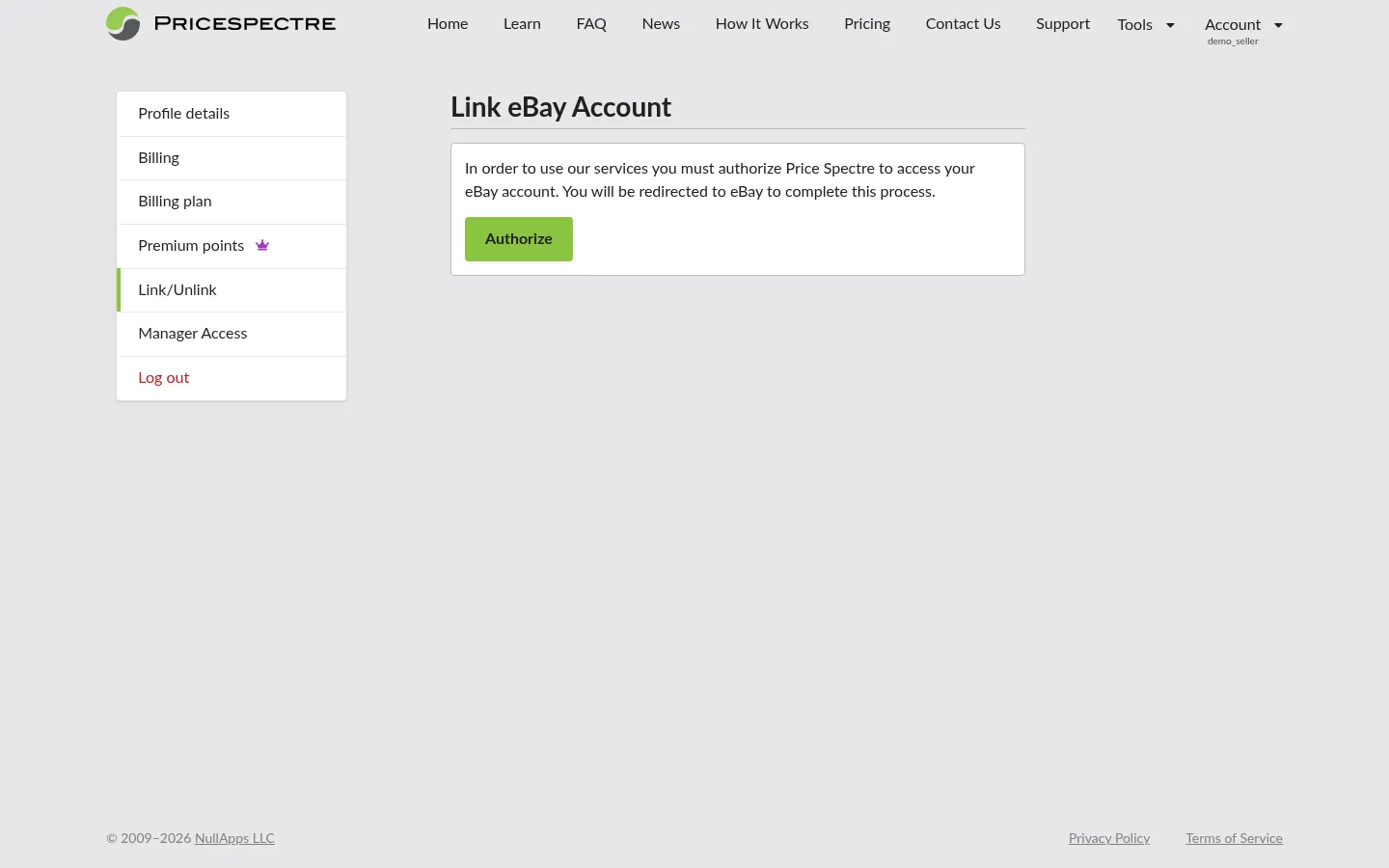
- From the navigation bar, open Account > Link/Unlink. This is the page you will return to any time you need to manage your eBay account connection.
- Click the Link eBay Account button.
- You will be redirected to eBay's official sign-in page. Sign in with the eBay account you want to manage.
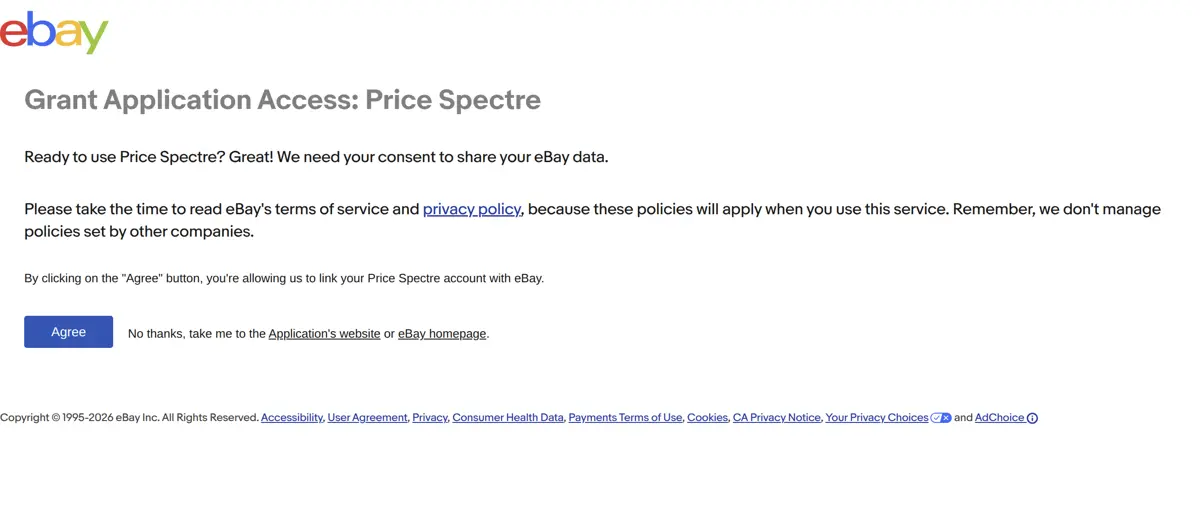
- eBay will then show a consent screen describing the permissions Price Spectre is requesting. Review them (see the next section for what each permission means) and click Agree to continue.
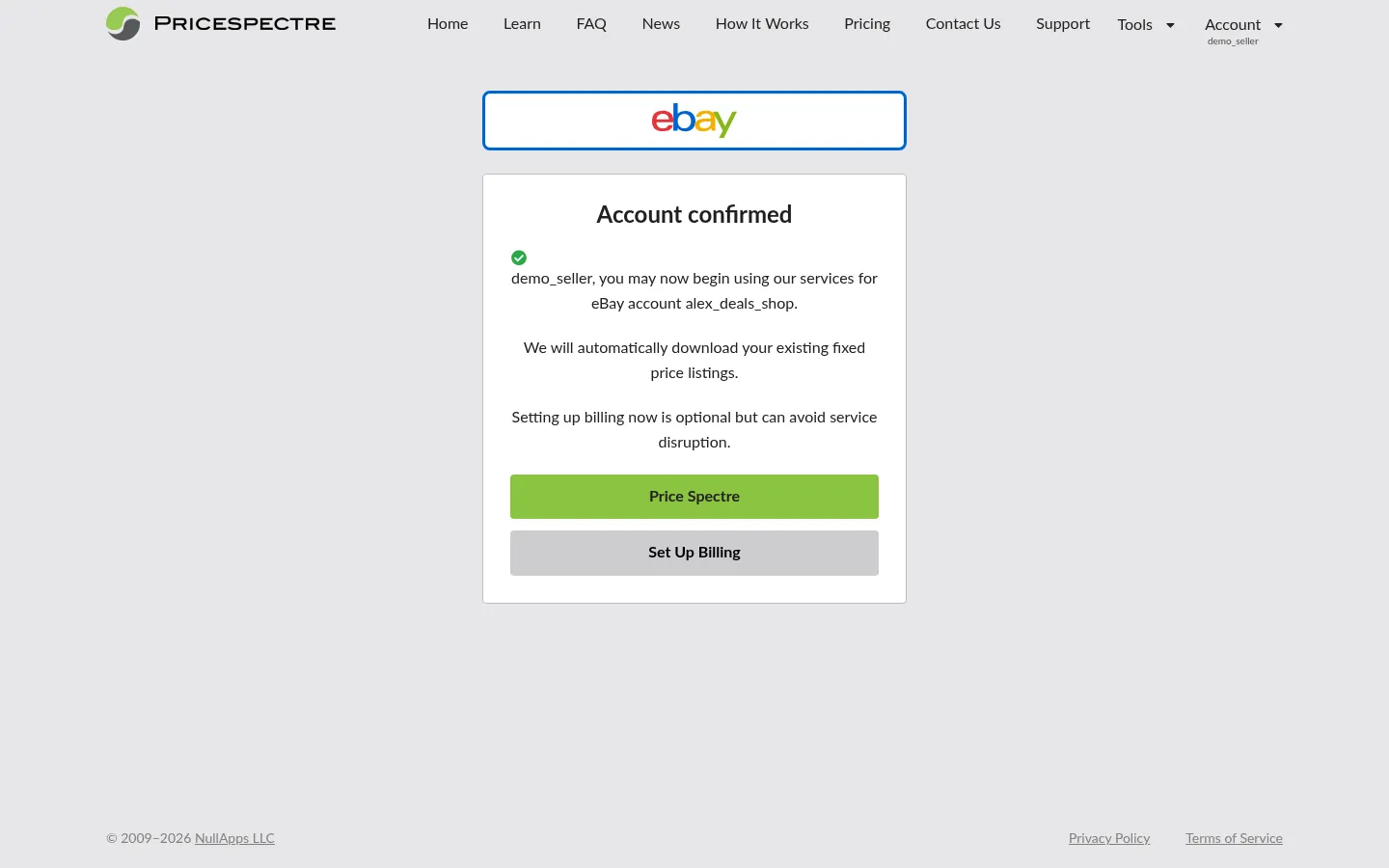
- eBay will redirect you back to Price Spectre. You should see a confirmation message that your account has been linked successfully.
Tip: The eBay consent page is hosted on ebay.com regardless of where your store is registered (eBay UK, eBay Germany, eBay Australia, and so on). Authorizing from ebay.com still links the correct seller account — there is nothing special you need to do for non-US stores.
Note: Stay in the same browser session for the entire flow. Switching to a different browser, profile, or device midway, or having an extension wipe cookies between sites, can break the redirect and leave the link incomplete.
If the eBay consent screen never appears, or you are returned to Price Spectre without a success message, jump to Troubleshooting Failed Links.
What Permissions Price Spectre Requests
When eBay shows the consent screen, it lists the things Price Spectre will be allowed to do on your behalf. At a user-facing level, these break down as follows:
| Permission | What it lets Price Spectre do | Why it is needed |
|---|---|---|
| View your listings | Read the active and recently ended listings on your eBay account, including titles, prices, quantities, conditions, and categories. | To populate your Price Spectre dashboard and detect changes you make on eBay directly. |
| Update your listings | Change the price (and, where applicable, the quantity or status) of listings you have set to managed in Price Spectre. | To apply repricing decisions automatically on the schedule you choose. |
| View your sales activity | Read recent sales and order data tied to your listings. | To inform features like the Reprice History timeline and the Competitive Price Reports. |
Price Spectre never asks for, stores, or sees your eBay password — sign-in always happens on eBay's own pages, and Price Spectre receives only an authorization that eBay can revoke at any time.
Tip: You can review and revoke Price Spectre's access from the eBay side at any time. In your eBay account preferences, look for the section that lists third-party applications you have authorized — Price Spectre will appear there once linked.
Note: Granting these permissions does not authorize Price Spectre to change anything outside the scope above. It cannot, for example, change your eBay store policies, payout settings, or buyer messages.
After Linking: What Happens Next
As soon as your eBay account is linked, Price Spectre begins downloading your listings. Most stores finish in seconds; very large stores can take a few minutes. You do not need to keep the page open while this happens — listings continue downloading in the background.
While the initial sync is running:
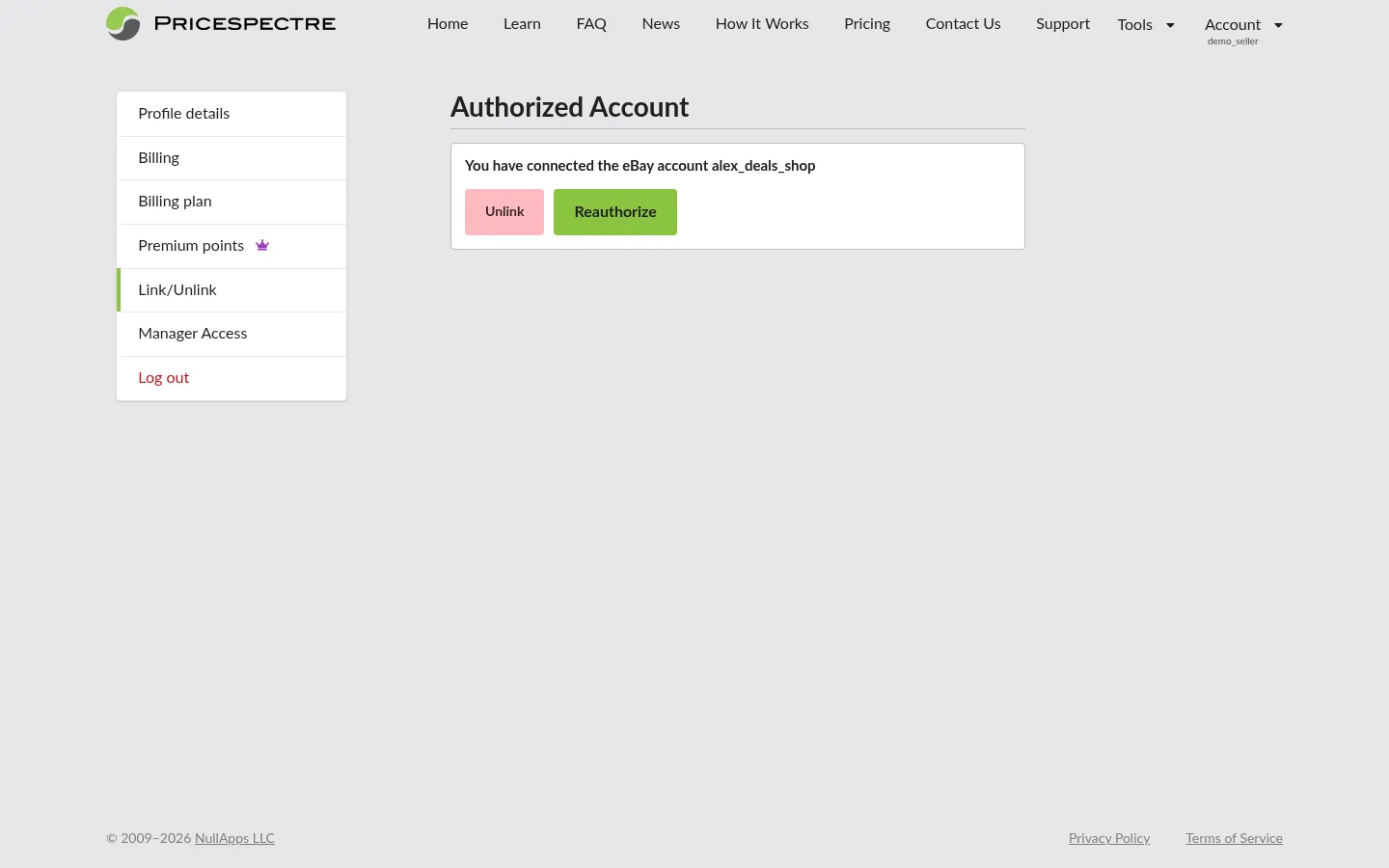
- The Account > Link/Unlink page shows your linked eBay seller ID and a connection status indicator.
- The main Tools > Price Spectre dashboard begins populating with your listings as they arrive.
- New listings you create on eBay later are picked up automatically on subsequent sync cycles — you do not need to re-link.
Tip: Before you set listings to managed, take a few minutes to configure your defaults under Tools > Set Defaults. New managed listings inherit those defaults, which saves a lot of per-listing setup work later. See the Account & Listing Defaults guide for details.
Every listing initially arrives as unmanaged — visible in your dashboard but not yet being repriced. Setting a listing to managed is a separate, deliberate step covered in the tutorial.
Reauthorizing an Expired Connection
eBay's authorization for third-party apps is time-limited by design. After a period of time — or after certain account events on the eBay side, such as a password change — eBay requires you to reauthorize Price Spectre. This is a normal part of using any eBay-connected app, not a sign that something is broken.
When the connection expires, you will see a few signals in Price Spectre:
- A Reauthorize banner at the top of the dashboard.
- A status change on the Account > Link/Unlink page from "Linked" to "Reauthorization required" (or similar wording).
- An optional email notification, if you have linking-related notifications enabled under Tools > Notifications.

To reauthorize:
- Open Account > Link/Unlink.
- Click the Reauthorize button next to your eBay account.
- Sign in to eBay (if you are not already signed in) and approve the same set of permissions on the consent screen.
- You will be redirected back to Price Spectre with a confirmation that the connection is restored.
Note: While the connection is in the "Reauthorization required" state, Price Spectre cannot read from or update your eBay account until you reauthorize. That means repricing is paused, listings sync is paused, and sales activity updates are paused — your dashboard will keep showing the most recent data it had, but it will not refresh until the connection is restored. Plan to reauthorize promptly to avoid a gap in repricing coverage and stale dashboard data.
Tip: Reauthorization is not the same as relinking from scratch. Your existing settings — managed status, floor and ceiling prices, search parameters, algorithm choices, downtimes — are preserved. You are only refreshing eBay's permission grant.
Managing Multiple eBay Accounts
Price Spectre is designed around a one-to-one relationship: one Price Spectre account links to one eBay seller account. This keeps billing, defaults, search parameters, and reprice history scoped cleanly to a single store.
If you operate more than one eBay store, you have two recommended options:
- Create a separate Price Spectre account for each eBay store. This is the right choice for sellers who want full independence between stores — different defaults, different algorithms, different billing. Each Price Spectre account goes through the linking flow independently.
- Use a manager account to oversee multiple Price Spectre accounts from one place. A manager account is granted access by each Price Spectre account owner and gives the manager a unified dashboard for switching between accounts and acting on each one's behalf. This is the right choice for agencies, virtual assistants, and sellers who genuinely want a single login spanning multiple stores.
For details on the manager workflow, see the Manager Access guide (granting access from a seller account) and the Manager Dashboard guide (using a manager account day to day).
Note: You cannot link a second eBay seller account to an existing Price Spectre account that already has one linked. If you try, Price Spectre will prompt you to either unlink the current account first or use one of the multi-account options above.
Unlinking an eBay Account
Unlinking removes Price Spectre's authorization to view and update your eBay listings. You might unlink because you are:
- Switching the Price Spectre account to a different eBay seller account.
- Stepping away from automated repricing for a while.
- Closing or transferring an eBay store.
To unlink:
- Open Account > Link/Unlink.
- Locate your linked eBay account in the list.
- Click the Unlink button next to it and confirm when prompted.
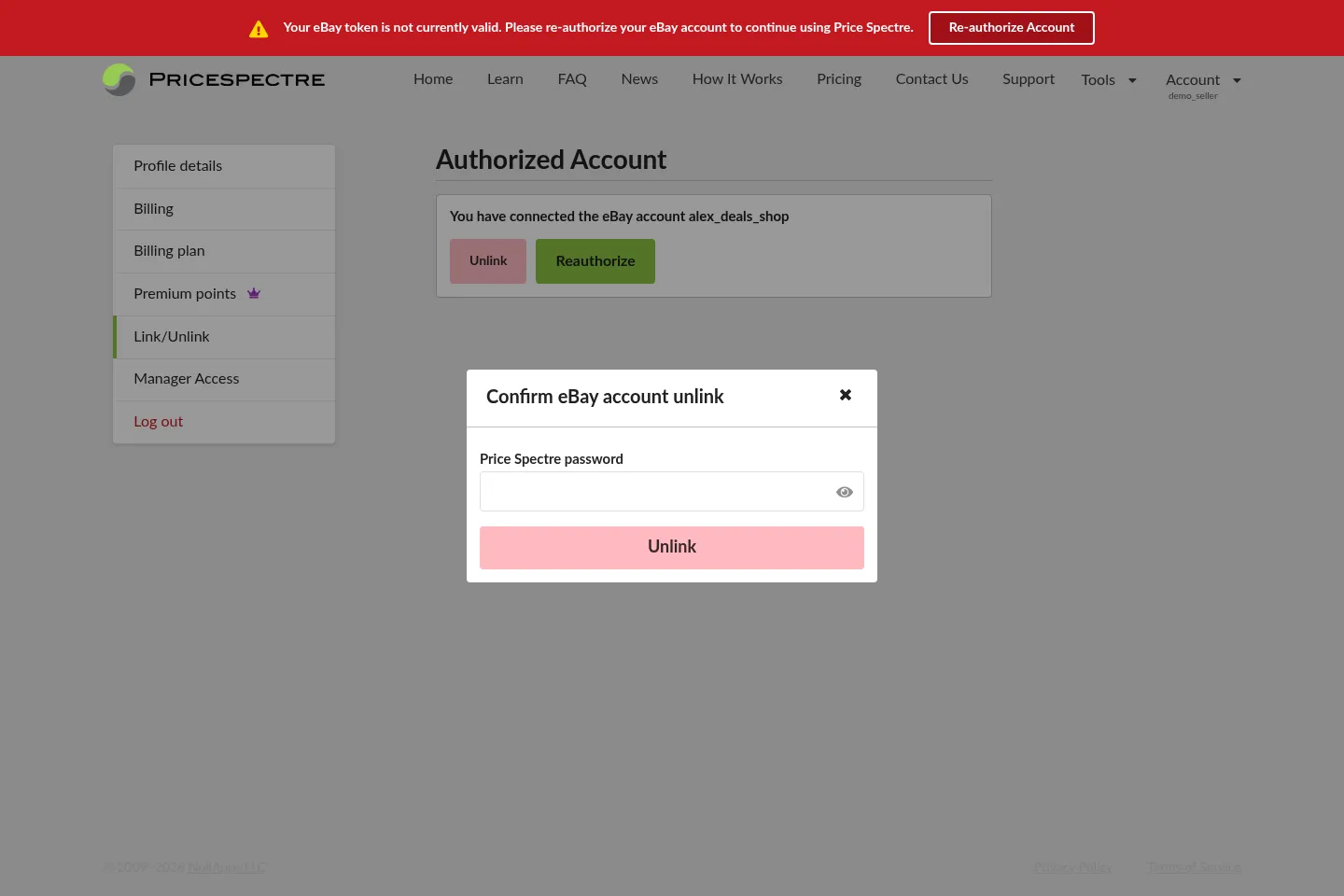
What happens after unlinking, in user-facing terms:
- Repricing stops immediately for any listings that were set to managed under that link. Your eBay prices stay where they were at the moment of unlinking — Price Spectre simply no longer changes them.
- Your Price Spectre account remains active. Settings such as floor and ceiling prices, algorithm assignments, search parameters, defaults, downtimes, and historical reprice records are preserved on your Price Spectre account.
- Billing for managed listings stops accruing for that account, though any outstanding balance from prior repricing is still owed.
Warning: Unlinking an account that has many managed listings is not reversible in the sense that those listings stop being repriced the moment you confirm. If you only want a temporary pause — for example, during a sale or inventory audit — use Tools > Schedule Downtimes instead. See the Schedule Downtimes guide for details.
If you later want to reconnect the same eBay account, you can do so by following the linking steps again. Most of your prior configuration will still be in place when listings reappear.
Troubleshooting Failed Links
If the linking flow does not complete successfully, the symptom you see usually points to one of a small set of causes. Use this table to narrow it down:
| Symptom | Likely cause | What to try |
|---|---|---|
| Clicking Link eBay Account does nothing, or you are not redirected to eBay. | A browser extension, strict tracking-protection mode, or security policy is blocking the redirect to eBay. | Disable ad/tracker/privacy extensions for Price Spectre and eBay (or whitelist both domains), then try again. A standard (non-private) browser window often works around overly strict defaults. |
| You sign in on eBay but never see the consent screen. | You are signed in to eBay with a buyer-only account, or with a different eBay account than you intended. | On eBay, sign out, then sign back in with the seller account you want to link. Restart the linking flow from Account > Link/Unlink. |
| You see the consent screen, click Agree, but Price Spectre does not show a success message. | The redirect from eBay back to Price Spectre was interrupted — typically by cookies being cleared between sites, the browser closing mid-flow, or a network drop. | Reload the Account > Link/Unlink page. If it still says "Not linked", restart the flow from step 1, ideally without switching tabs or browsers during the redirect. |
| The flow keeps looping back to the Link eBay Account button without ever completing. | Cross-site cookies are being blocked or wiped during the redirect, which prevents Price Spectre from associating eBay's response with your session. | Allow cookies for both Price Spectre and eBay, turn off any "delete cookies on tab close" or "clear site data on navigation" extensions, and try again. |
| You completed the flow, but the dashboard is still empty after several minutes. | Initial listings sync is still running, or your store is unusually large. | Wait a few more minutes and refresh the dashboard. If it remains empty for a long time, check Tools > Errors for any sync issues, and see the Errors & Troubleshooting guide. |
| Reauthorize button takes you to eBay but bounces you back without a success message. | Same root causes as the equivalent linking failures above (blocked redirect, cookies cleared mid-flow, wrong eBay account). | Apply the same fixes, then click Reauthorize again from Account > Link/Unlink. |
Tip: If you suspect cookie or session issues, try the linking or reauthorization flow from a fresh private/incognito browser window with extensions disabled. That clears stale eBay sessions and most extension interference in one step. Just confirm cookies are allowed for both sites in that window.
Note: You do not need to use a regional eBay site to link a non-US store. The consent screen lives on ebay.com regardless of where your store is registered, and authorizing from ebay.com correctly links your account.
If none of the above resolves the issue, contact support via the Contact Us option in the application — include the eBay seller ID you are trying to link and a brief description of the symptom.
Frequently Asked Questions
Can I link a sandbox or test eBay account?
The linking flow is designed for live eBay seller accounts. If you are doing internal testing, contact support before attempting to link a sandbox account — the regular flow is not intended for sandbox use.
Will my eBay competitors be able to tell that I use Price Spectre?
No. Price changes made by Price Spectre look the same to buyers and competitors as price changes made manually through eBay's own seller tools. There is no "powered by Price Spectre" indicator on your listings.
My store is on eBay UK (or another non-US region). Do I need to do anything different?
No. The consent page is always hosted on ebay.com regardless of your store's registered region, and authorizing from ebay.com correctly links your account. You do not need to switch to a regional eBay site beforehand.
Why was I logged out of eBay in the middle of linking?
eBay sessions can time out independently of Price Spectre, and signing in to a different eBay region can also clear your session. If this happens, simply restart the link from Account > Link/Unlink and sign in again.
Does unlinking cancel my Price Spectre subscription?
No. Unlinking only removes the connection to your eBay account. Your Price Spectre account, billing plan, and account history all remain in place. To change your subscription, use Account > Billing Plan.
How often do I have to reauthorize?
That depends on eBay's authorization lifetime, which can change over time and is set by eBay rather than Price Spectre. In practice, expect occasional reauthorization prompts. Enable linking-related notifications in Tools > Notifications so you find out as soon as one is needed.
My eBay token expired while I was on vacation — did I lose my settings?
No. An expired token pauses all communication with eBay (both reads and price updates), but it does not delete any settings. When you reauthorize, listings sync resumes, and all of your floor/ceiling prices, algorithm choices, search parameters, defaults, and history are still there.
Can two Price Spectre accounts link to the same eBay seller account at once?
No. An eBay seller account can be linked to one Price Spectre account at a time. If you link it to a second Price Spectre account, the previous link is replaced.
Related Guides
- Price Spectre Tutorial — the end-to-end onboarding guide; start here if you are new.
- Account & Listing Defaults — configure defaults so new managed listings inherit your floor, ceiling, algorithm, and search settings.
- Errors & Troubleshooting — broader troubleshooting for sync errors, listing errors, and repricing failures beyond the linking flow.
- Schedule Downtimes — pause repricing without unlinking your eBay account.
- Manager Access — grant a manager account access to your Price Spectre account.
- Manager Dashboard — use a manager account to oversee multiple seller accounts from one place.